
Compound models in the Solid MCP server
How Solid routes text-to-SQL requests across one or more semantic models, and combines them when needed.
Business questions don't always fit neatly within a single semantic model. Until now, modelers needed to know which model contained the relevant context — or couldn't answer questions that crossed model boundaries.
Compound Models solve this. Pass a list of semantic model IDs through MCP and Solid automatically identifies the right models, brings their assets together, and generates a single SQL response from the combined context.
How it works
- Ask Solid a business question via MCP.
- Provide Solid with a list of semantic model IDs.
- Solid selects up to two relevant models and returns a Text2SQL response grounded in their joint context.
Agents and modelers can now ask broader, cross-domain questions while continuing to benefit from the accuracy and governance of their existing semantic models.
This page explains in detail how routing works, how models are selected, and how two models are combined into one.
How you pass models to the MCP
Every text-to-SQL request accepts an optional semantic layer ids parameter. There are three ways to call it, and each takes a different route:
| What you send | What Solid does |
|---|---|
| No model IDs | Auto-selects the best model from your account's certified models. |
| One model ID | Uses that model directly, after checking it's valid and in scope. |
| A list of model IDs | Runs compound selection — picks the best one, or combines up to two complementary models. |
Routing happens up frontThe routing decision is made during a verification step, before any SQL is generated.
Here's how those three paths flow through the system:
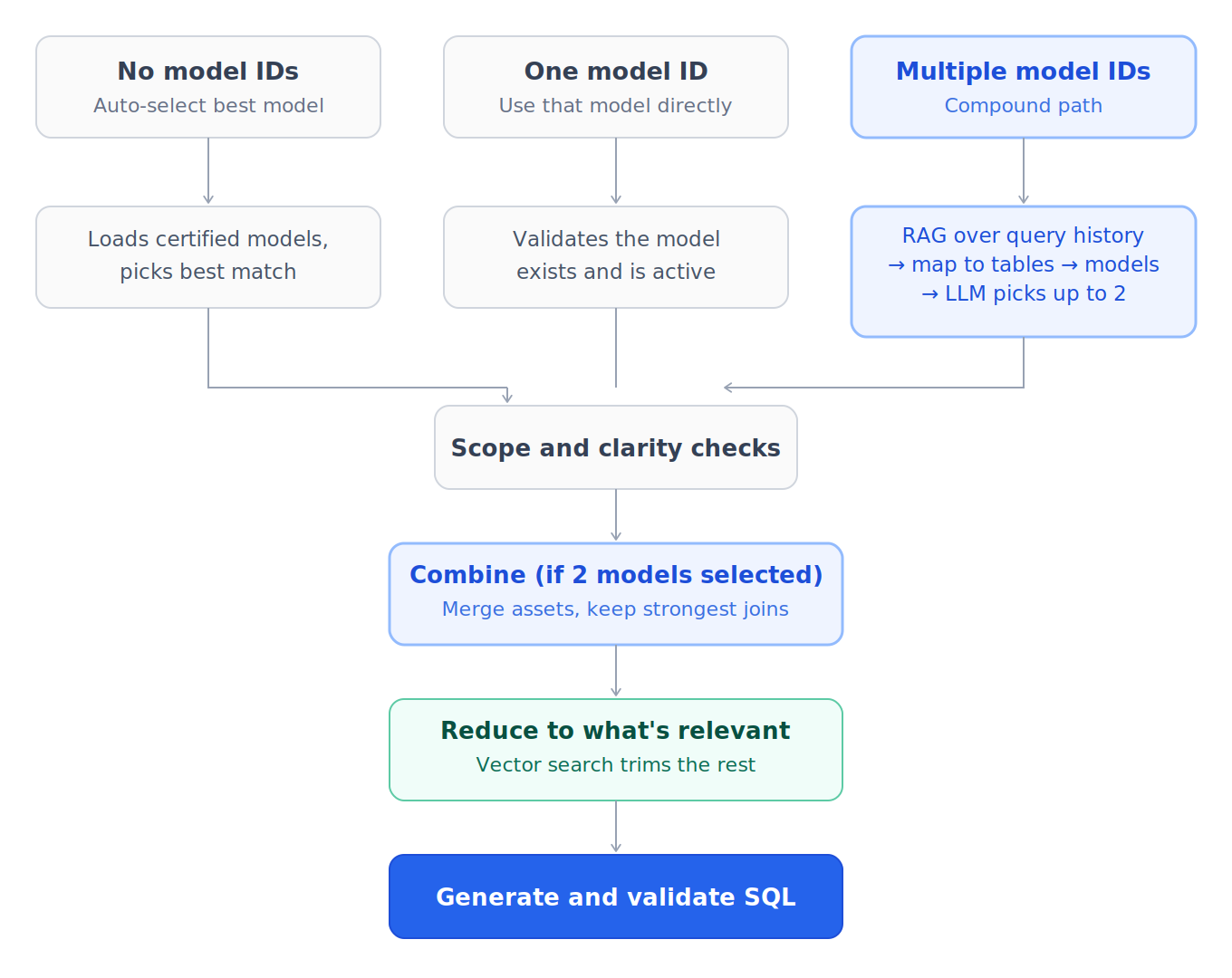
Routing at the verification step
No model IDs provided
- Solid loads your account's active, certified models (up to 20).
- If there's only one, it's used.
- If there are several, a model-selection process picks the single best match, using each model's name, description, tables, and business questions.
- The question is then checked for scope (does this model cover the question?) and clarity (is the question specific enough?).
- If no certified models exist, the request is rejected with a message asking you to pass a specific model ID.
One model ID provided
- Solid validates the model exists, is not deleted, and is active.
- It runs the same scope and clarity checks against that model.
- The model is used as-is.
Multiple model IDs provided
This is the compound path. Instead of forcing one model, Solid decides whether the question is best answered by a single model or by combining two complementary models. The selection process is described next.
How models are selected (compound path)
Selection is a funnel: retrieve broadly, narrow down by evidence, then let an LLM make the final call.
- RAG over your queries. The question — plus a few automatically generated variations — is searched against your historical queries. This surfaces the real queries that look most like the question, across your whole query history.
- Map queries to tables to models. Each retrieved query is mapped to the tables it touches. Tables that belong to one of the candidate models are kept; everything else is dropped. Those tables are then mapped back to the candidate models. A model "gets a hit" when one of its tables is reached this way.
- Decide how many models are in play. Fewer than two models hit means Solid falls back to single-model selection, since there isn't enough evidence to apply RAG. Two or more models hit means the LLM chooses up to two complementary models that together cover the question.
- LLM complementary selection. For each candidate, the LLM sees a rich description: the model's name and description, its tables and columns (with short descriptions), its business questions, its benchmark questions (curated example questions the model is known to answer), and its joins (how the model's own tables connect). Using this, the LLM returns zero, one, or two model IDs — zero means the question is out of scope; one or two are carried forward.
- Scope and clarity checks run on the selected model(s) before moving on.
Combining models (aggregation)
When two models are selected, Solid combines them into a single, larger model by merging their assets and identifying the connections between them:
- Collect every table, column, query, and metric from both selected models into one asset set.
- Identify the connected assets — the cross-model joins that link a table in one model to a table in the other — and score them by relevance to the question. Only the strongest cross-model joins are kept.
- Add bridging queries and gap-fill columns so the combined model has what it needs to actually execute those joins.
- Attach relevant metrics that apply to the merged set of tables.
- De-duplicate everything and merge the custom instructions from both models.
Reducing the model
Before SQL is written, the (single or combined) model is narrowed to what the question actually needs. Solid uses vector search to keep only the most relevant tables, columns, and example queries, and drops the rest.
- Combined models are always reduced.
- Large single models are reduced when they exceed a size threshold.
This keeps the SQL prompt focused and accurate.
Generating the SQL
Finally, the reduced asset set — tables, columns, joins, metrics, example queries, and the merged custom instructions — is handed to SQL generation, which writes and validates the query.
Because the model was routed, combined, and reduced around the question, the generated SQL only uses the assets that are genuinely relevant.
Summary
- Send no IDs to let Solid pick the best model automatically.
- Send one ID to pin a specific model.
- Send several IDs to let Solid route to the best single model or combine two complementary ones.
- Selection is driven by your query history (RAG), then by table, description, business, and benchmark evidence, with an LLM making the final choice.
- Combining, reducing, and SQL generation all stay scoped to the specific question.
In shortCompound models keep the right data in scope automatically, whether that's one model or two.
Model Scoping Best Practice
- Models should be granular and specific to a use case, not broad catch-alls. Overly broad models reduce routing precision and increase hallucination risk.
- Each model's description and the list of business questions it's designed to answer are the primary routing signals. These should be carefully authored by the modeler.
- For agent platforms that should only access specific semantic models, the agent's MCP scope can be limited to a specific set of model identifiers.
- Best practice is to keep models scoped to under ~100 columns to maximize routing precision and SQL accuracy. Larger models increase the risk of the LLM selecting incorrect joins or metrics.
Real-World Examples
Loan Approval Agent (Retail Banking)
An agent receives a loan application and must:
- Assess risk: "Analyze the last 12 months of cash flow. Is income consistent? Are there overdraft fees?" → Routes to a "Customer Cash Flow History" semantic model
- Price the loan: "What interest rate should we offer this customer?" → Routes to a "Current Interest Rates by Category" semantic model
Each question routes to a different model; results are composed by the agent. The agent's LLM synthesizes the decision (e.g., "Suggested Rate: 5.4% APR based on 'Gold' credit tier").
B2B Account Health Agent (SaaS / B2B Tech)
An agent generating a daily account health summary for a Customer Success Manager:
- Usage risk: "Has product usage for this account dropped relative to the trailing 90-day baseline?" → Routes to a "Product Usage Rollups" semantic model
- Open issues: "What support cases were opened in the last 30 days for this account?" → Routes to a "Customer Support Ticket Analysis" semantic model
Each question routes to a different model; results are composed by the agent into a prioritized next-best-action recommendation for the CSM.
Retail Merchandising Agent (Retail / CPG)
An agent compiling a daily merchant briefing:
- Sales performance: "How does today's category sales compare to last year at the store and channel level?" → Routes to a "Daily Sales Performance" semantic model
- Operational coverage: "Are foot-traffic counters active for all stores in the affected region?" → Routes to a "Store Traffic and Conversion" semantic model
Results are combined into a daily briefing that flags underperforming categories and operational gaps for the merchant team.
Updated about 2 months ago